For classrooms, schools and education teams

Classroom CO2 monitoring built around real school routines

Check a concern with a portable logger, or follow multiple classrooms remotely with connected monitors, history and alerts. Choose the workflow first; then choose the device.

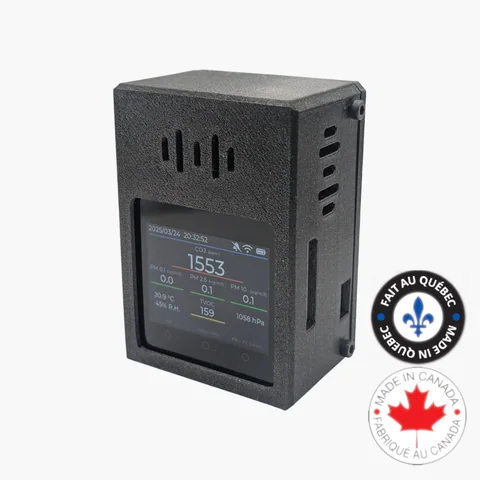
VisiblAir Model E-Lite connected classroom air quality monitor

Portable study or continuous classroom view?

Both approaches can reveal patterns, but they differ in staff time, coverage and access to readings.

Portable and offline checks

Use Model F when staff need a visible CO2 reading during a room check. Use Model D when a rechargeable logger should stay in a classroom and provide a local CSV afterward, without joining school Wi-Fi.

Fits: pilot studies, temporary classrooms, troubleshooting and spaces where network approval is not yet available.

Connected multi-classroom monitoring

Use E-Lite or Model O for current and historical data in the cloud portal. Authorized staff can review rooms remotely and receive configured metric or offline-sensor email alerts.

Fits: ongoing facilities review, seasonal comparisons and deployments where retrieving every logger is impractical.

Choose by classroom workflow

School needRecommended modelMeasurements and accessDeployment considerationNext step
Staff spot checksModel FCO2 displayed on the device with portable data logging.A staff member moves and reads the monitor.View Model F
No-Wi-Fi classroom studyModel DCO2, temperature and humidity; battery-powered local logging and CSV export.Retrieve the device to review results; no remote dashboard.View Model D
Connected classroomModel E-LiteCO2, PM2.5, VOC index, temperature, humidity and pressure with cloud history; internal memory bridges Wi-Fi outages.Requires 2.4 GHz Wi-Fi and USB-C power.View E-Lite
Wired lab or campus roomModel OCO2, PM, VOC, NOx, temperature, humidity and pressure; Wi-Fi or Ethernet, USB-C or optional PoE.Coordinate Ethernet/PoE and device-network rules with IT.View Model O

These monitors provide environmental measurements and reporting tools. This page does not claim certification or compliance with a school, health or building standard. See the full model comparison for specifications.

A rollout that staff can sustain

1. Define the question

Decide whether the pilot should identify time-of-day patterns, compare room types, investigate a complaint or create an ongoing remote view. Write down who reviews results and what happens after a notification.

2. Pilot representative rooms

Include different ages, occupancy levels, ventilation types and building areas. A one-week snapshot may miss schedule or weather effects, so preserve context such as class periods and window use.

3. Standardize names and placement

Use consistent school, floor and room identifiers. Place monitors in the occupied zone, away from direct vents, windows, doors and a student's immediate exhaled breath.

4. Expand after reviewing operations

Confirm power, network onboarding, alert recipients and staff ownership before scaling. Free cloud access covers up to 10 sensors per account; current per-sensor fees apply above 10.

Example room mix

  • General classrooms: prioritize frequently occupied enclosed rooms.
  • Portable buildings: test network and power separately from the main building.
  • Labs and workshops: consider broader PM/VOC/NOx sensing when relevant to activities.
  • Libraries and shared spaces: compare quiet and high-occupancy periods.
  • Gymnasiums: choose representative placement and account for changing occupancy.

Dashboards, alerts and school data

Connected models send readings to the VisiblAir cloud portal for authorized remote access and history. Threshold rules can email account owners or configured recipients; offline alerts can report a device that stops sending.

Use alerts as prompts for a documented school response, not as automatic proof of a cause or as a substitute for professional ventilation assessment.

Privacy and ownership at a glance

  • The devices collect environmental sensor data; plan room names so they do not include student or staff names.
  • VisiblAir's statement says customers own their sensor data.
  • Data can be exported in standard formats, with API access available for integrations.
  • Customer data is stored on servers in Québec, Canada, according to the published statement.

Three common school scenarios

Single-room concern

Use Model F for immediate visible checks or Model D for an offline time series. Record schedule and room changes alongside the data.

Ten-room pilot

Place connected sensors in a representative mix. The first 10 cloud-connected devices fit within the account's free access tier.

Campus deployment

Coordinate facilities and IT. Mix E-Lite on managed Wi-Fi with Model O where Ethernet or PoE is the more dependable permanent path.

Before installing

  • Inventory rooms, schedules, ventilation types and power.
  • Confirm 2.4 GHz Wi-Fi or Ethernet/PoE policies with IT.
  • Choose non-identifying device names.
  • Document consistent placement and avoid tampering risks.
  • Assign dashboard, export and alert responsibility.

Evidence you can review

Equip one classroom or prepare a school-wide quote

Buy individual monitors online, or send room count, desired measurements, available networks and timeline for a multi-unit recommendation.