For offices, facilities and commercial buildings

CO2 monitoring that scales from one room to a building portfolio

Start with portable checks when the question is “where is ventilation struggling?” Move to connected sensors when facilities teams need dashboards, alerts and history across occupied rooms.

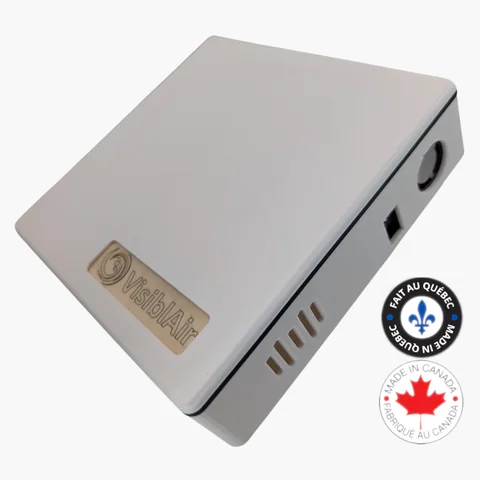
VisiblAir Model O Ethernet and optional PoE air quality monitor

Match the monitoring method to the decision

A portable survey and a permanent building network answer different questions. Many projects use both.

Portable checks and commissioning

Move a display-equipped Model F between meeting rooms, or use Model D for battery-powered local CSV logging. This suits short surveys, complaint follow-up and deciding where permanent sensors add value.

Trade-off: someone must place, retrieve and interpret the monitor. It does not provide a live building-wide view.

Continuous connected monitoring

Keep a sensor in each priority space to build history through meetings, occupancy changes and seasons. Facilities staff can review multiple devices in the cloud portal and configure threshold or offline-sensor email alerts.

Trade-off: permanent power and network planning are part of the deployment.

Which active model fits your building?

Deployment needRecommended modelWhy it fitsKnow before choosingNext step
Walk-through checksModel FPortable CO2 monitor with an on-device display and data logging.Best for attended checks, not unattended remote monitoring.View Model F
Offline room studyModel DRechargeable, Wi-Fi-free CO2, temperature and humidity logging with local CSV export.Data is reviewed after retrieval; there is no live dashboard.View Model D
Wi-Fi officesModel E-LiteCO2, PM2.5, VOC index, temperature, humidity and pressure; internal memory syncs after Wi-Fi interruptions.Requires 2.4 GHz Wi-Fi and USB-C power for a fixed deployment.View E-Lite
Wired or PoE roomsModel OCO2, PM, VOC, NOx, temperature, humidity and pressure with Wi-Fi or Ethernet; USB-C or optional PoE power.Confirm network-port and PoE availability with IT.View Model O

For every specification, use the complete product comparison. These recommendations describe product capabilities, not compliance with a building certification or standard.

From readings to facilities action

See rooms together

Connected devices report to the cloud portal for remote current and historical readings. Cloud access is free for up to 10 devices on an account; current per-sensor fees apply above 10.

Notify the right people

Configure metric thresholds, recipients, muted weekdays, cool-off periods, escalation rules and offline-sensor alerts. Alerts support response workflows; they do not replace a building automation control system.

Keep access to your data

Export standard formats and use available API access for internal analysis or integrations. VisiblAir states that sensor data belongs to the customer and is stored in Québec, Canada.

History

Compare occupied periods, rooms and seasons.

Email alerts

Route threshold and offline notices.

Exports

Keep a portable copy for reports.

API access

Connect readings to maintained workflows.

Practical deployment patterns

Small office

Use a connected monitor in the busiest shared room and portable checks elsewhere. Review full meeting days before adding devices.

Meeting-room cluster

Assign one sensor per enclosed, frequently occupied room. Name devices by floor and room; alert on sustained conditions or missing data.

Multi-floor building

Pilot representative zones. Choose Model O where Ethernet or PoE simplifies installation; E-Lite where managed 2.4 GHz Wi-Fi and USB-C are available.

Placement checklist

  • Prioritize enclosed occupied rooms, not corridors.
  • Place at representative breathing-zone height.
  • Avoid direct supply air, windows, doors and occupants' exhaled breath.
  • Confirm stable power and the intended network path.
  • Record room, floor and device names.

Procurement checklist

  • Outcome: spot survey, trends or alerts?
  • Coverage: which rooms and occupancy patterns?
  • Measurements: CO2 only, or PM/VOC/NOx too?
  • Infrastructure: Wi-Fi, Ethernet, PoE and/or USB-C?
  • Ownership: who reviews dashboards, exports and alerts?

Start with one room or plan the whole deployment

Individual devices are available online. For quantities, mixed models or infrastructure questions, describe your rooms and network options.

VisiblAir products are designed and manufactured in Canada. International shipping is available; checkout prices are in CAD.